Showcase Video: [UE] Advanced Texture Tool – Showcase
Documentation: Documentation Advanced Texture Tool
This tool is included in the Advanced Assets Tool
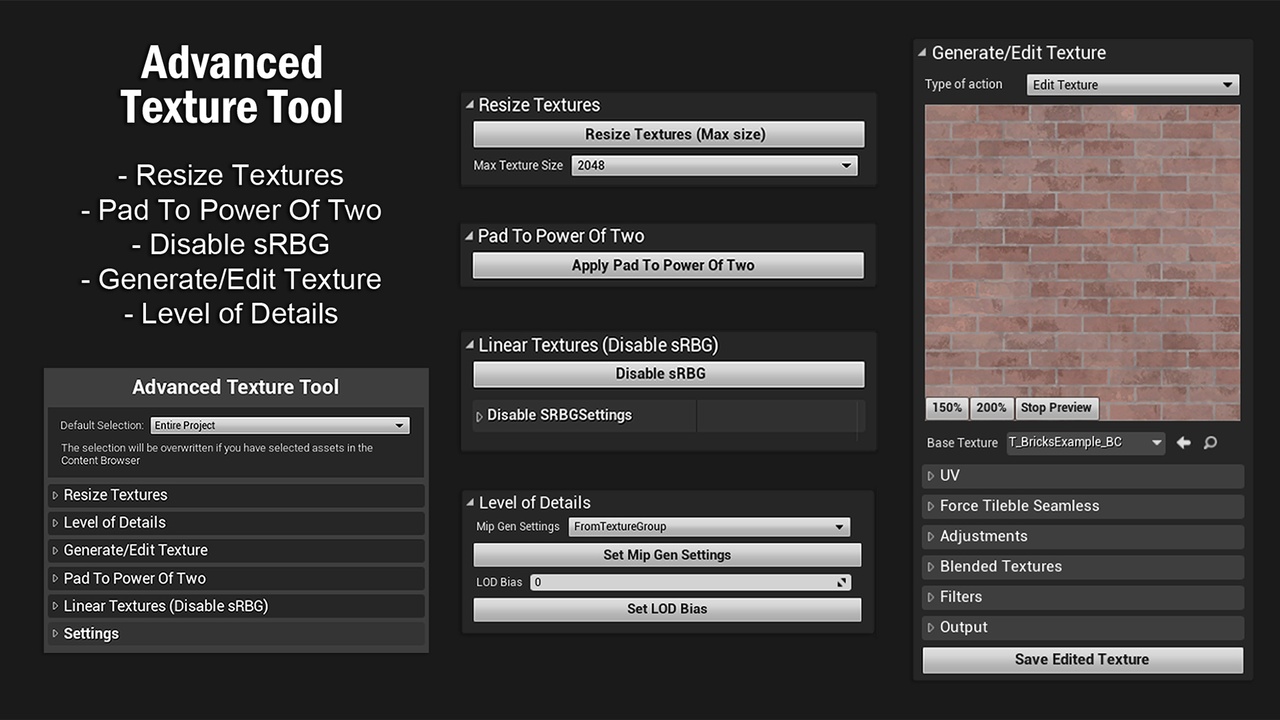
Modifying/editing textures can take a lot of time and effort, this tool will help you work easier and more efficiently! You’ll not have to export the texture external and edit it, you’ll be able to edit textures directly in the engine. Using this tool, you’ll be able to optimize, edit, or create new textures.
It’s extremely easy to use because it has an intuitive, simple, editing bulk, and elegant UI.
Features:
Resize Textures (Using LOD Bias)
Pad Power Of Two Mode
Disable sRBG
Generate/Edit Texture
Level of Details
Generate/Edit Texture – types: Edit Texture, Convert to Normal, Texture Channel Packer
Example of Edit Texture Features:
UV – Tiling, Rotation, Shift
Force Tileable Seamless
Adjustments such as Brightness, Contrast, Saturation, Hue, etc.
Blended Textures – multiple blend modes such as Multiply, Screen, Add, Pin Light, etc.
Filters such as Edge Detection, Toon Outline Style, Sharpen, Blur, Motion Blur, Pixelate and Noise.
This tool has tooltips for most of the buttons/parameters. They appear while hovering the mouse over a button and disappear when you move it away from the button.