[Showcase Video 1] [Showcase Video 2] [Showcase Video 3] [Documentation]
The Dynamic Campfire blueprint creates a realistic and seamless burning simulation with dynamic materials, lighting, sound, and particle effects.
Start with a fresh pile of tree branches and dried grass. Light the fire and watch as it dynamically burns, reflecting temperature changes in real time. You can stop the fire at any moment and observe it smoldering, gradually fading into the last glowing embers.
This asset features a fuel system, meaning the fire will burn only while there is Available Wood. Once depleted, it naturally extinguishes—unless more wood is added. A secondary input allows players to add wood, triggering immersive cue sounds and ember particles, just like in a real campfire.
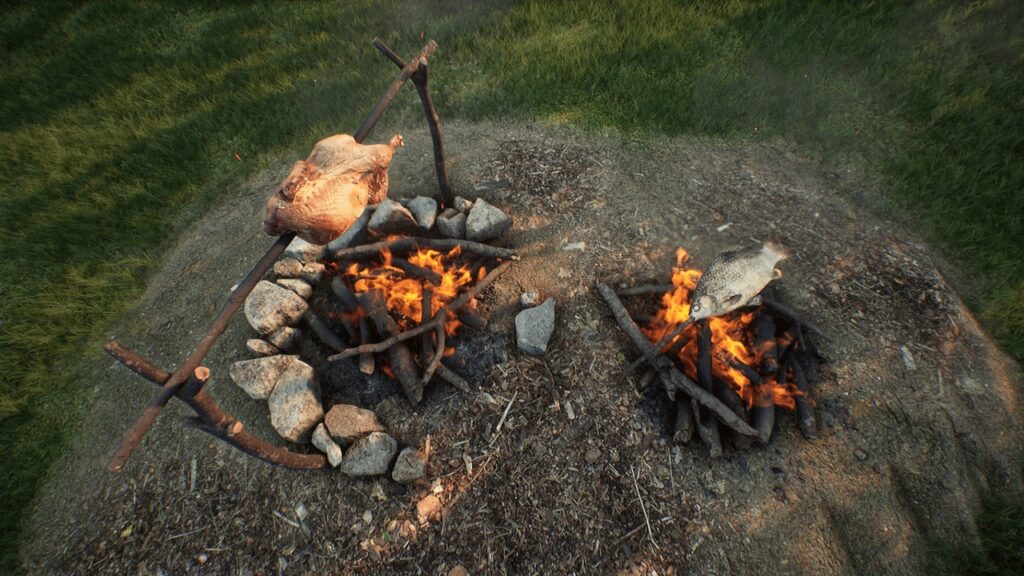
For added realism, decorative meshes such as rocks, a fish or chicken cooking on a stick can be placed around the fire. The fish and chicken will also cook dynamically as the fire burns.
Another key feature is that everything in this blueprint is Network Replicated, ensuring smooth and synchronized functionality in both Single and Multiplayer environments.
Interacting with the Dynamic Campfire during game-play:
There are two main interaction methods available:
Line Trace Interaction – Ideal for first-person projects, where the player interacts with the environment using a crosshair.
Overlap Interaction – Designed for third-person projects or games where the player interacts by pressing a key when within range of the campfire.
Bonus version specifically for Ambience and Cinematics.
Since Update V4, the Dynamic Campfire includes a Static Campfire blueprint, allowing you to use the campfire as a static prop with a manually selectable burning state. This feature is perfect for cinematics, giving you full control over the fire’s appearance directly within the editor.