
This asset is compatible with Story Framework 4.1
Requires the Blueprint File Utilities Plugin to be enabled.
DESCRIPTION
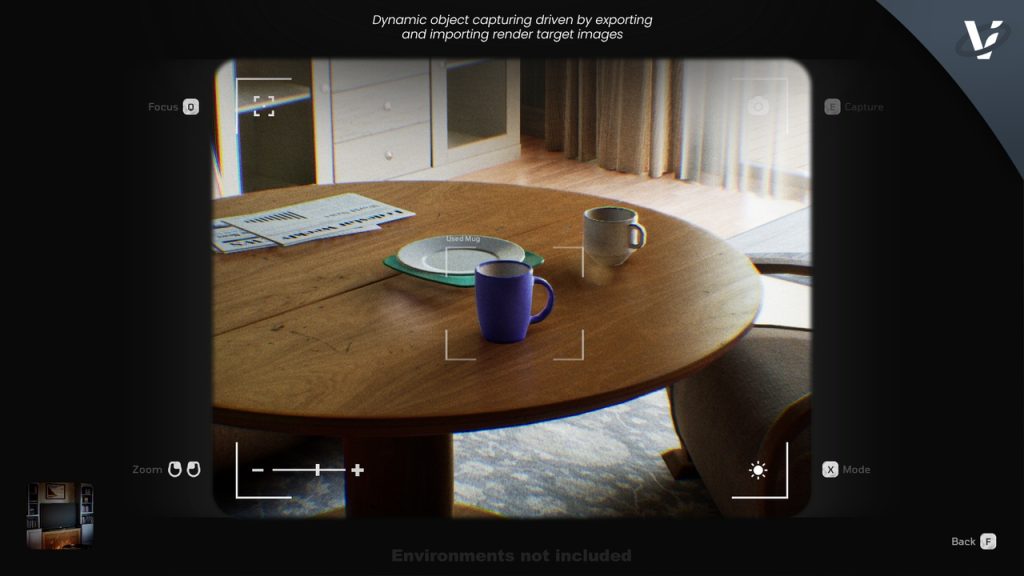
A quick and effective digital camera system aimed at being more of an interactive implementation of a generic photo camera. Zooming, light modes, target focusing, and capturing all blends together to deliver something fun for the player to use, while also staying somewhat true to real-world digital cameras. Logic is driven by customizable Data Tables that contain a variety of settings and values to change for different objects. Objects that can be photographed are defined by simply applying an Actor Tag, and the DigiCam Component handles the rest. Deepen your projects lore, and converse more of your narrative to the player through DigiCam. Learn more about DigiCam through it’s Documentation Page.
Find out more about DigiCam in the FAQ’s section towards the bottom of DigiCam’s store page.
_________________________________________________________
FEATURES
✅ First or Third Person Support
camera support out-of-the-box.
✅ Gamepad integration
built-in. Inputs and widget classes with “gamepad” settings.
✅ Screen-space based
photographing objects are determined by the size that they occupy on-screen.
✅ Zoom capabilities
zoom in/out to change the size of the object looked at, effecting its screen size (as mentioned above).
✅ Night Mode
includes a togglable mode for photography in dark environments
✅ Per-object Customization
customizable values for objects through a Data Table.
✅ Camera Customization
options to edit camera logic such as zoom amount, night mode light intensity, post process values, etc.
✅ Subtitled Sounds
custom widget solution for creating sounds with subtitles on screen.
✅ Photo Book
View your collection of photographs in a photo album style widget.
✅ Save/Load Ready
For modularity reasons DigiCam does not come with any save system, but rather focuses on easily referencing any needed values to save/load.
✅ Complete Documentation
explaining and educating you on everything about DigiCam.
✅ Includes free to use Sounds, and other Assets